
Proof of TCPA Consent: What a Certified Digital Record Captures, and How ExpressConsent Works

ExpressConsent records exactly what a person saw when they agreed to marketing calls or texts, then stores it as a Certified Digital Record. This guide covers what goes into that record, how it works, and what it can’t do.
Why TCPA consent evidence matters
The Telephone Consumer Protection Act limits marketing calls and texts that use an autodialer or a prerecorded voice. For telemarketing like that, the FCC’s rules say the caller needs the person’s prior express written consent first, with a few exceptions.
The FCC defines that consent in 47 CFR § 64.1200(f)(9) as “an agreement, in writing, bearing the signature of the person called” that clearly authorizes the seller to send those messages to a specific phone number. The agreement has to include a clear and conspicuous disclosure that signing authorizes the calls and that signing isn’t required to buy anything. An electronic signature can count if it’s valid under federal law or state contract law.
The statute gives people a way to enforce this. Under 47 U.S.C. § 227(b)(3), a person can bring a private action for violations of that part of the law, where state law or court rules allow it.
That’s why evidence matters. Anyone can file a complaint alleging that a call or text went out without consent. A lawsuit is an allegation, not a finding. But if you’re the company on the other side, you may be asked to show what the person actually agreed to.
A database row that says “checkbox: true” tells you almost nothing about what the person saw. Was the disclosure on the screen? Was the box already checked? Was the phone number visible? A picture of the full page, taken at the moment of submission, answers those questions directly. That’s the idea behind this kind of record.
What a Certified Digital Record is
Here’s how ExpressConsent describes it. When someone submits a consent form on your site, your page calls ExpressConsent’s script. The script takes a screenshot of the whole page and stores it in the cloud as a Certified Digital Record, or CDR. You get an ID back that confirms the evidence is saved.
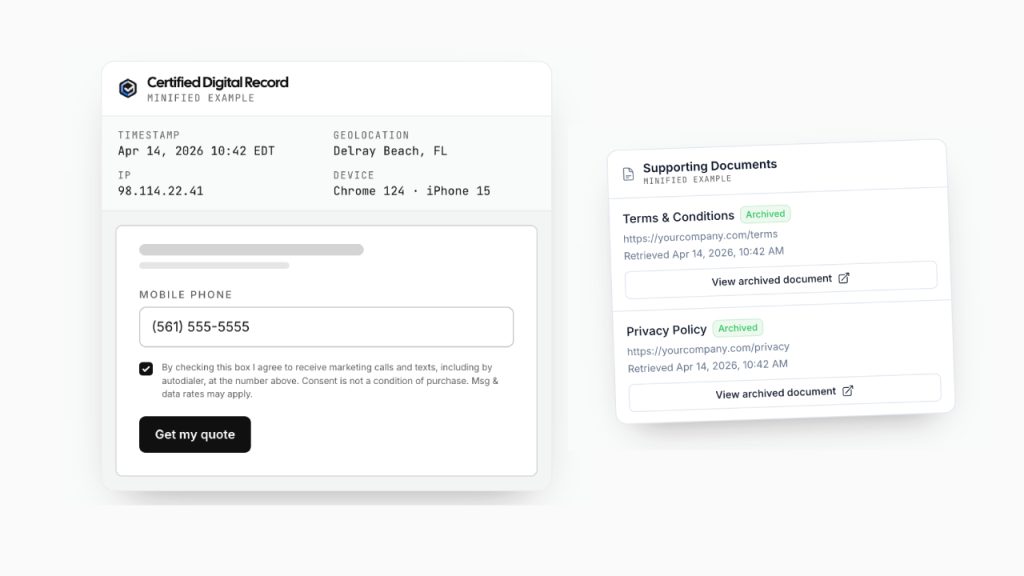
ExpressConsent also points out that it’s a third party, so the record doesn’t live only in your own systems. It says it can certify that the record is legitimate and hasn’t been tampered with.
What goes into a record
A full-page image of what the person saw, including the consent wording, the checkbox and the phone number field. The control they pressed to submit is outlined.
IP address, the observed chain of IP addresses, browser and device, and a location based on the IP. Timestamps are part of the record itself.
The disclosure text that was on the page, whether a consent checkbox was tied to it, and whether the box was checked at submission. These are recorded only when a submission is detected.
Anything you attach at capture, like a phone number, email or campaign ID, so you can find the record later.
ExpressConsent says it keeps records for five years.
How it works, step by step
- Add the script. Put ExpressConsent’s script on the page that has your consent form.
- Tag the form. Mark the disclosure text, the checkbox and the submit button so the record can pull out structured consent facts.
- Capture on submit. Call the capture function when the person submits the form, not before. That way the record shows what the completed form said when it was sent, including the phone number they agreed to be contacted at.
- Save the record ID. The ID that comes back confirms the evidence was stored. If you attach your own fields at capture, you can look the record up by any of them later.
Timing is the detail people miss. ExpressConsent’s docs are blunt about it: capture at submission, not before. Their how-it-works page explains why.
Who uses it
In lead generation, the evidence often has to travel with the lead. ExpressConsent’s docs describe two roles. A lead generator runs the website with the consent form and captures the record. A lead buyer gets the lead along with a share link and pulls the evidence into their own account with a single API request, without installing anything. One company often plays both roles.
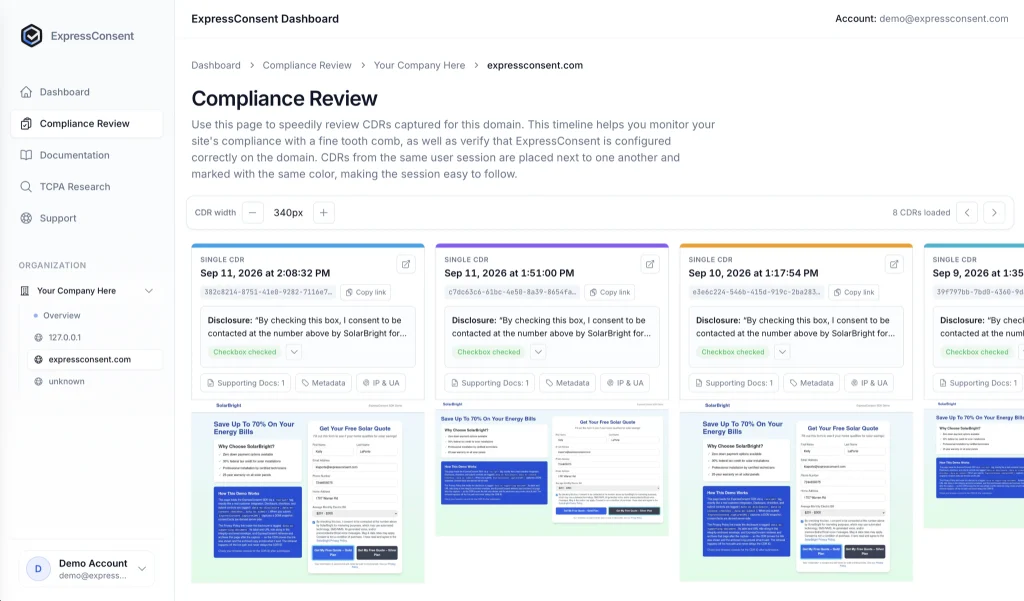
Plenty of sites collect consent across several pages, like co-registration funnels. ExpressConsent groups the captures from one person’s visit in one browser tab into a single package, so a buyer can see the whole flow. It uses tab storage for this, not cookies, and it doesn’t follow people across visits. ExpressConsent has a longer write-up on co-registration consent if that’s your setup.
Extras worth knowing about
If your consent text links to a privacy policy or terms, ExpressConsent can also store what was on the other side of the link, with the time it was retrieved and a SHA-256 fingerprint of the contents. The page has to be public, and a record holds up to ten documents.
Mark a field and its value never gets stored. That suits things like passwords or card numbers. The docs warn against redacting the consent wording, the checkbox or the phone number, because the record needs those to do its job.
Optional, and off by default. If you turn it on, ExpressConsent can attach a bot-detection result from Anura to a record.
What a record can’t do
A record shows what happened on your page. It can’t tell you whether your consent wording meets the FCC’s rule, whether a court will accept a particular record, or how a case would end. Those depend on your wording, your process and the facts of each situation. Have a TCPA attorney look at your disclosure language, and treat any record as evidence, not as a result.
ExpressConsent at a glance (according to ExpressConsent)
Frequently asked questions
How long does ExpressConsent keep a record?
ExpressConsent says five years, with storage included. How long you should keep consent records is a question for your own attorney.
Do I need a developer to set it up?
ExpressConsent’s docs describe it as adding a script and calling one function when the form is submitted, plus tagging the parts of the form. The docs walk through each step.
Can I send a record to a lead buyer?
Yes. According to the docs, you can create a share link when you capture the record and pass it along with the lead. The buyer pulls the evidence into their own account with one request.
What does it cost?
ExpressConsent says pricing is tiered by volume, with a 30-day free trial and no yearly contract. For actual numbers, ask them for their pricing sheet.
If I have a record, will I win a lawsuit?
No one can promise that. A record is evidence of what the person saw and did. Outcomes depend on the facts, the wording of the disclosure and the court.
See a record built from your own consent form
ExpressConsent offers a 30-day free trial. Pick a time and they’ll walk you through the record format, the dashboard and the API in about 20 minutes.
Talk to ExpressConsentTCPA Today is an independent news and educational resource powered by ExpressConsent.
Sources
- 47 U.S.C. § 227, Cornell Legal Information Institute
- 47 CFR § 64.1200, Cornell Legal Information Institute
- ExpressConsent: homepage, how it works, lead generators and lead buyers, sessions, archiving linked documents, redaction, bot detection
Last updated: November 3, 2026
Disclaimer: TCPA Today is an independent news and educational resource powered by ExpressConsent. This article is general information and is not legal advice. Statements about ExpressConsent come from ExpressConsent’s own website and documentation. Allegations in legal proceedings are not findings of wrongdoing unless established by a court.